
What it needs
The wlshare daemon runs inside the Wayland session it shares, as the user who owns it, and speaks to the compositor through wlroots' public protocols. Any wlroots compositor that offers them is the same kind of peer:
| Protocol | For |
|---|---|
wlr-screencopy | the picture, version 2 or later; required |
ext-image-copy-capture | the pointer's image, captured apart from the picture; required |
wlr-output-management | resizing and rescaling a headless output for the client |
| virtual keyboard and pointer | the client's keyboard and mouse |
wlr-data-control | the clipboard, both ways |
The pointer is never in the captured pixels: wlshare sends its image apart, at the output's density, and the client moves it without waiting for a frame. On a headless output that takes wlroots 0.19, the first whose headless backend keeps the cursor on a plane of its own; 0.18 paints it into the capture. The sound, the camera and the microphone go through PipeWire, which the package depends on.
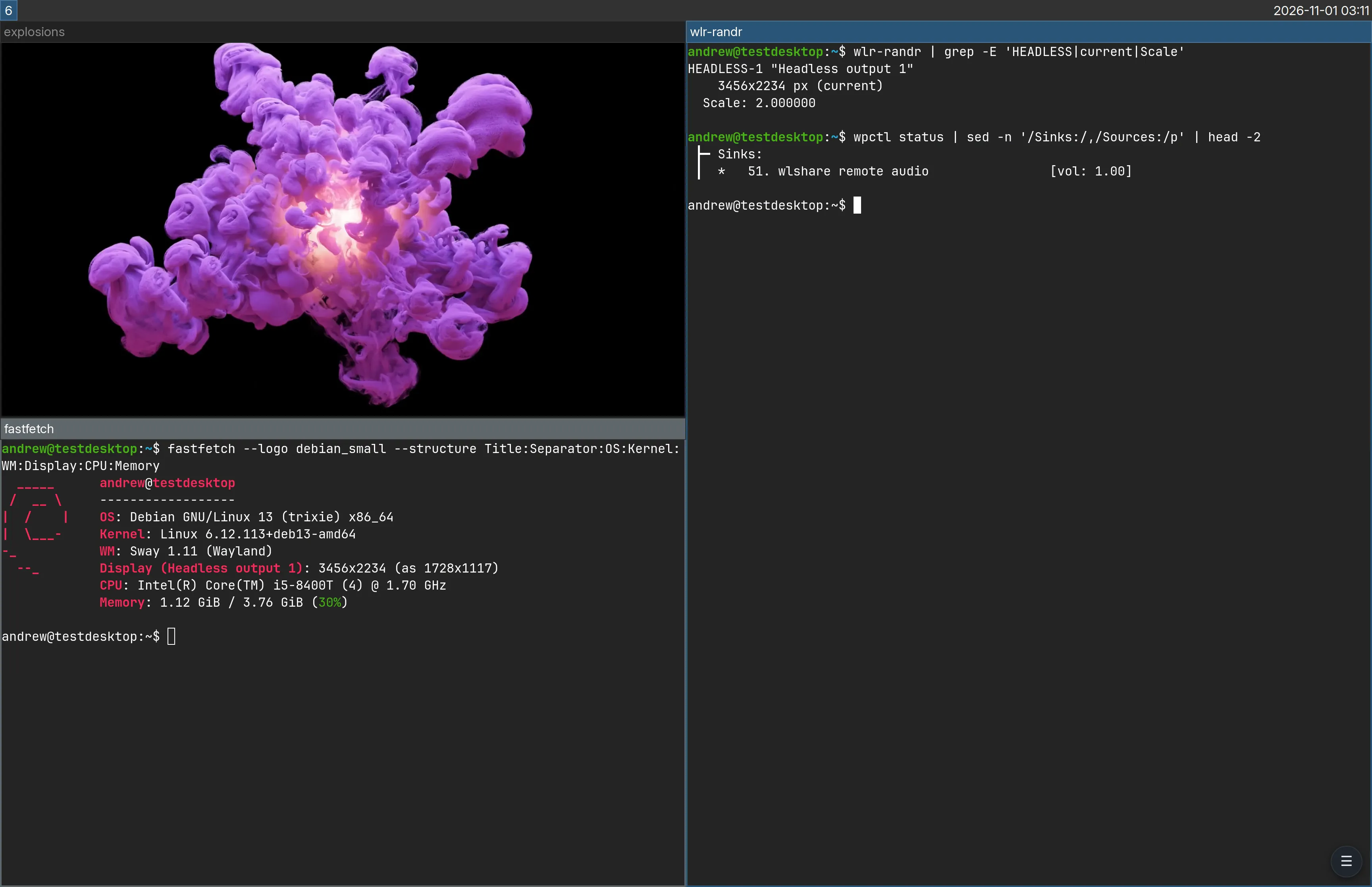
wlr-randr reports the headless output at scale 2, and wpctl wlshare's own sink while the browser listens.Installing
No backward compatibility. A wlshare release may change or remove a setting, a private extension's wire format or a feature, with nothing that reads the old form. Check /usr/share/doc/wlshare/wlshare.example.toml against your config when you upgrade.
Debian trixie ships sway 1.10 and labwc 0.8.3 on wlroots 0.18, and wlshare's own signed APT repository has sway 1.11, labwc 0.9.7 and wlroots 0.19 rebuilt for trixie from Debian's packaging, for amd64 and arm64, and this is what needs each:
| Package | What needs it |
|---|---|
| wlroots 0.19 | The cursor capture, ext-image-copy-capture, that wlshare does not start without, and the pointer kept out of a headless output's picture, which 0.18 paints into every capture. The wlshare package depends on it. |
| wlroots' one patch | On labwc with two outputs, the client's pointer where it is put after labwc reloads its configuration (labwc --reconfigure). labwc then maps every pointer back to the output it names, which wlshare's has none of, and stretches its positions across the whole layout, on both outputs, until the outputs are next laid out anew; wlshare makes its pointer again on every change to the layout, on any wlroots, but a reload changes none. A desktop with one output, and sway, need no patch: a stock wlroots 0.19 or later is enough. |
| sway 1.11, labwc 0.9.7 | The releases built against wlroots 0.19, rebuilt unchanged: trixie's sway 1.10 and labwc 0.8.3 link 0.18, which wlshare does not start on. |
Their versions sort above trixie's, so no pin is needed:
sudo mkdir -p /etc/apt/keyrings
sudo curl -fsSL -o /etc/apt/keyrings/wlshare.gpg https://andrewtheguy.github.io/wlshare/wlshare.gpg
sudo tee /etc/apt/sources.list.d/wlshare.sources <<'EOF'
Types: deb
URIs: https://andrewtheguy.github.io/wlshare
Suites: trixie
Components: main
Signed-By: /etc/apt/keyrings/wlshare.gpg
EOF
sudo apt update && sudo apt install sway  # or labwc
The wlshare package itself is on its releases, not in the repository. Put the version in place of 0.0.x, and arm64 for amd64 on an arm64 host:
curl -fsSLO https://github.com/andrewtheguy/wlshare/releases/download/v0.0.x/wlshare-trixie-amd64.deb
sudo apt install ./wlshare-trixie-amd64.deb
It depends on libwlroots-0.19, which the repository above provides, and on pipewire, wireplumber and pipewire-pulse. It recommends xdg-desktop-portal-gtk, for a browser on the desktop to find the client's camera, and va-driver-all, for the host's hardware H.264 encoder.
The zDesk gateway and wlshare must speak the same version of wlshare's protocol, which wlshare --version names. A session against a wlshare of another version fails at connect, naming both; upgrade whichever is older. A release that changes nothing of the protocol keeps its version.
Running it
The configuration is one TOML file, $XDG_CONFIG_HOME/wlshare/config.toml by default, and an empty file takes every default. The package installs a systemd user unit, started with the graphical session once the session has handed WAYLAND_DISPLAY to the user manager:
mkdir -p ~/.config/wlshare
cp /usr/share/doc/wlshare/wlshare.example.toml ~/.config/wlshare/config.toml
systemctl --user enable --now wlshare.service
journalctl --user -u wlshare -f
By hand, name the session's socket: WAYLAND_DISPLAY=wayland-1 wlshare. It listens on listen, 127.0.0.1:5900 unless set, and shares the compositor's first output, or the one output names.
One client is on the desktop at a time. A connection that finishes the handshake, login included, takes the desktop from whoever holds it, as Windows Remote Desktop does, and the client it was taken from is told who took it. The RFB shared flag changes nothing. So a client that died leaves nothing behind: connecting again takes the desktop back, with the keys and buttons the old one held released. The one exception is the holder's own second connection, which is shown another output (see Outputs).
Who may connect
One setting, with three answers. Classic VncAuth is offered under none of them.
Nobody asked
Neither table set.
- Login
- none
- Encrypted
- no
- For
- a
listenon loopback, a VPN address or behind an SSH tunnel
The system login
[pam]
- Login
- the username and password of the account wlshare runs as, checked by PAM
- Encrypted
- RSA-AES
- For
- a desktop whose account password is the way in, and can unlock its keyring
A password of its own
[password]
- Login
- one password, checked against an Argon2 hash in the config
- Encrypted
- RSA-AES
- For
- a host where no system account's password should be the way in
listen = "[::]:5900"

[pam]
# service = "wlshare"   # /etc/pam.d/wlshare, from the package
Under [pam] any username but the account wlshare runs as is refused before PAM is asked anything, since the desktop behind the port is that one user's. For [password], wlshare hash-password asks for the password and prints the hash to paste as hash; the password itself is never written down. Either way the server's RSA key is generated on first start beside the config, and its fingerprint is logged, for comparing with the one the client shows: the zDesk gateway logs the one it saw.
The keyring, unlocked by the login
A headless desktop started by systemd has no display manager to hand the login password to the keyring, so the login keyring stays locked until an application asks and someone answers a prompt. Under [pam] the password PAM has just checked can do it: a pam_exec line in /etc/pam.d/wlshare's auth stack, after common-auth, passes it to a script that starts gnome-keyring-daemon --login and then --start, both halves of what pam_gnome_keyring would do, since wlshare opens no PAM session for its session hook to run in:
@include common-auth
auth    optional    pam_exec.so expose_authtok quiet /usr/local/lib/wlshare/unlock-keyring
@include common-account
Neither wlshare nor its package supplies that script; this is it:
#!/bin/sh
# /usr/local/lib/wlshare/unlock-keyring: run by pam_exec from /etc/pam.d/wlshare
# with the password PAM has just checked on stdin. It starts the keyring daemon
# with it, both halves of what pam_gnome_keyring does, since wlshare opens no
# PAM session.
set -eu
XDG_RUNTIME_DIR="/run/user/$(id -u)"
DBUS_SESSION_BUS_ADDRESS="unix:path=$XDG_RUNTIME_DIR/bus"
export XDG_RUNTIME_DIR DBUS_SESSION_BUS_ADDRESS

# A daemon already holding the Secret Service: an earlier login unlocked it.
owner=$(busctl --user list --no-legend 2>/dev/null |
    awk '$1 == "org.freedesktop.secrets" && $2 != "-" { print $2 }')
[ -z "$owner" ] || exit 0

# In a scope of its own, so that restarting wlshare does not take it down.
systemd-run --user --scope --quiet --collect --unit=gnome-keyring-login \
    /usr/bin/gnome-keyring-daemon --daemonize --login --components=pkcs11,secrets

# --start only once that daemon listens, or it starts a second one.
i=0
while [ ! -S "$XDG_RUNTIME_DIR/keyring/control" ] && [ "$i" -lt 50 ]; do
    i=$((i + 1)); sleep 0.1
done
[ -S "$XDG_RUNTIME_DIR/keyring/control" ] || exit 0
exec /usr/bin/gnome-keyring-daemon --start >/dev/null 2>&1
Install it where the line names it, with the keyring's packages, and mask the daemon's activation:
sudo apt install gnome-keyring libpam-gnome-keyring
sudo install -D -m 755 unlock-keyring /usr/local/lib/wlshare/unlock-keyring
systemctl --user mask gnome-keyring-daemon.socket gnome-keyring-daemon.serviceoptional, so a keyring that will not open costs a prompt inside the session, never the VNC login. Mask gnome-keyring-daemon.socket and .service, so no daemon started by activation owns the Secret Service before the one holding the password. Change the account's password with passwd, which re-encrypts the keyring through PAM; a hash written into /etc/shadow any other way leaves the keyring under the old one.
A headless desktop, up at boot
wlroots' headless backend drives no display and opens no input device, so the compositor needs no seat and no logind session: it can be a systemd user service, and with lingering it comes up at boot with nobody logged in. It makes one output, HEADLESS-1, which wlshare shares and resizes for each client. This is how the demo's sway and LXQt desktops run.
The user manager
Started at boot by
loginctl enable-linger, and starts the compositor's unit- at boot, lingering
The compositor
sway or labwc with
WLR_BACKENDS=headless; once its socket exists it starts its session target- with the session
wlshare
wlshare.service, wanted bygraphical-session.target, which the session target binds to
# ~/.config/systemd/user/sway-headless.service
[Unit]
Description=sway (headless)
After=dbus.socket

[Service]
Environment=WLR_BACKENDS=headless
Environment=WLR_LIBINPUT_NO_DEVICES=1
ExecStart=/usr/bin/sway
# graphical-session.target is what wlshare is reached through: stop it with the compositor
ExecStopPost=-/usr/bin/systemctl --user stop graphical-session.target
Restart=on-failure

[Install]
WantedBy=default.target
# ~/.config/systemd/user/sway-session.target
[Unit]
Description=sway session
BindsTo=graphical-session.targetThe compositor hands its environment to the user manager and starts the target once its socket exists, at the end of sway's config (labwc runs the same two lines from ~/.config/labwc/autostart):
exec systemctl --user import-environment WAYLAND_DISPLAY SWAYSOCK XDG_CURRENT_DESKTOP \
    && systemctl --user start sway-session.target
loginctl enable-linger "$USER"
systemctl --user daemon-reload
systemctl --user enable --now sway-headless.service wlshare.serviceStopping only the session target on the way out would leave wlshare restarting against a compositor that is gone, which is why the compositor's unit stops graphical-session.target itself. Pin HEADLESS-1 at the origin in the compositor's config, so an output made for a second display lands to its right.
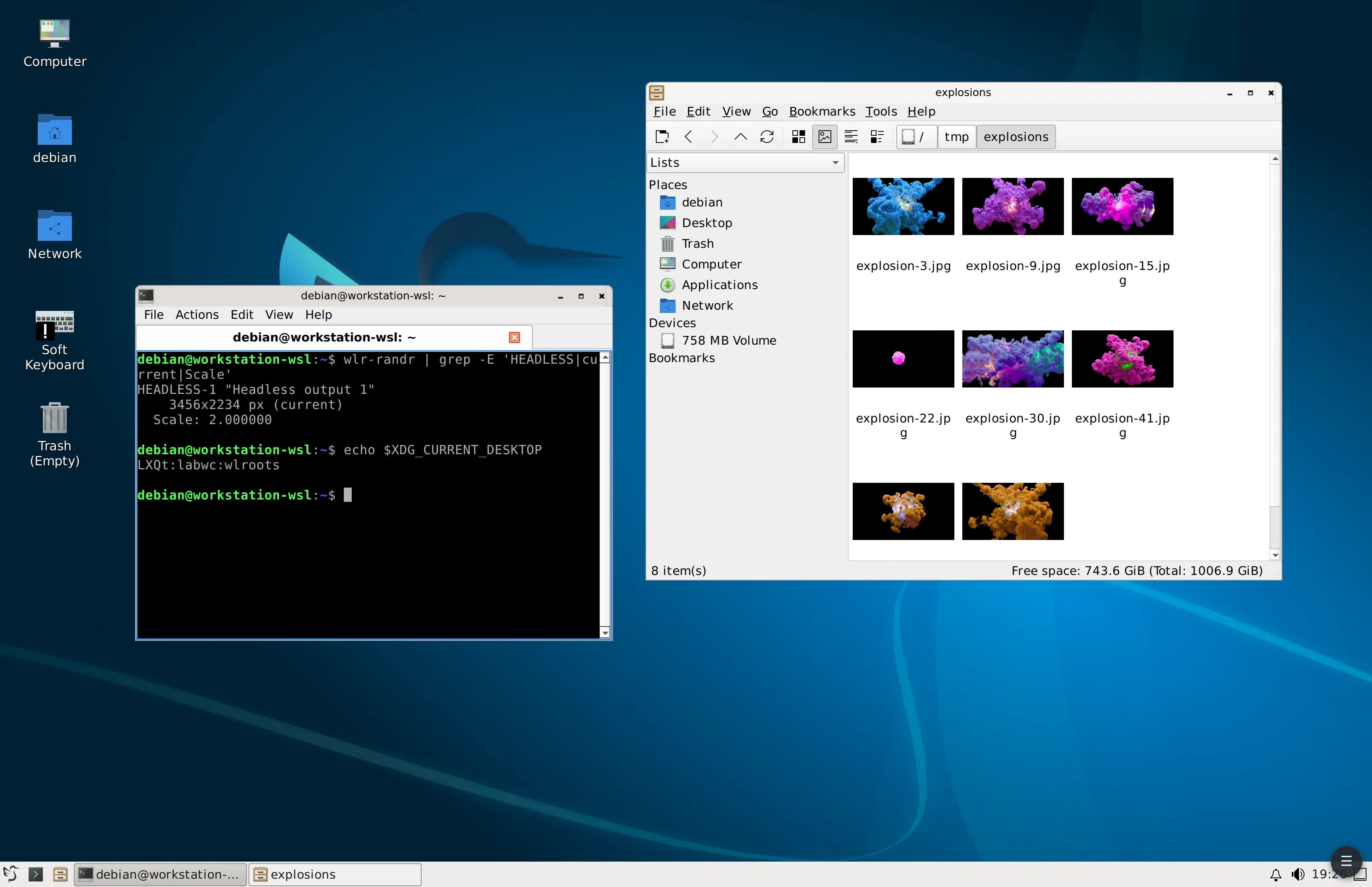
Outputs
Each connection shows one output; outputs are never joined into one framebuffer. A client that asks, as zDesk does, is sent the list of the session's outputs and switches among them, and the same client's second connection is shown another output beside the first, with its own size and density: two at once, and no more. A plain VNC client sees one, output or the one the last client chose.
Only a HEADLESS-* output is resized or rescaled for a client; a monitor keeps its modes. output names a preference, not a requirement: while the compositor has no output of that name another is shared, and the desktop moves to it when it appears.
Two virtual displays beta
A client may ask for one virtual display or two, as an RDP client asks a Windows host for its monitors. On sway wlshare makes and unplugs headless outputs through sway's IPC, found in SWAYSOCK, until there are that many, with nothing to configure: a zDesk target with virtual_displays = 2 is given a second, and the next session asking for one has it unplugged. On another compositor the outputs are what the compositor has.
A desktop at the console too
A desktop on a real monitor can be handed to a client as a headless output of its own size and density, with the monitors dark while it is watched from elsewhere and back when it is left. The daemon says whether a client is on the desktop on state_socket, and wlshare watch follows that from a process of its own and runs a command for each:
# config.toml
output = "HEADLESS-1"
state_socket = "wlshare/state.sock"
output_wait_secs = 5
wlshare watch \
--held "swaymsg 'output HEADLESS-1 enable, output DP-1 disable'" \
--free "swaymsg 'output DP-1 enable, output HEADLESS-1 disable'"--heldruns when a client takes the desktop, and--freewhen nobody has held it for--free-after-secs(5), so neither runs for a client that reconnects inside the wait. A takeover is not a change.- sway moves a disabled output's workspaces to an enabled one, so the windows follow onto the headless output. With
output_wait_secsthe client taking the desktop waits forHEADLESS-1to be enabled, and starts on it rather than on the monitor. - The socket closes when the daemon goes, however it went, and the watcher reads that as the desktop left: a wlshare killed with a client on the desktop still gives the monitors back. The watcher runs the command for where the desktop stands whenever it starts, so both must be safe to run twice.
- Create
HEADLESS-1at session start (swaymsg create_output) where no monitor is adjacent, far to the left of them, so the pointer cannot wander onto it from the console.
A desktop left dark comes back from a console or over SSH, with SWAYSOCK set: swaymsg 'output * enable'. Run the watcher as a user unit beside wlshare's, part of graphical-session.target, so it starts and stops with the session.
Sound, camera and microphone
Always on, with nothing to configure: a client asks for each, and zDesk does in a session started with them.
| On the desktop | While | |
|---|---|---|
| Sound | a PipeWire sink, wlshare remote audio, made the default; its monitor sent as FLAC or Opus, whichever the client asked for | a client listens |
| Camera | a PipeWire video source, wlshare remote camera, from the client's H.264, decoded with the system's libavcodec | an application has it open |
| Microphone | a PipeWire audio source, wlshare remote microphone, from the client's 16-bit PCM | an application records |
While a client listens, every stream that follows the default plays into wlshare's sink and is silent on the host; an application pinned to a sink of the host's is still heard there. When the last listener goes, the sink goes and the host's own is the default again. A headless desktop needs no sound card.
A browser on the desktop reaches the camera through xdg-desktop-portal's Camera interface, offered only beside a backend that implements Access, such as xdg-desktop-portal-gtk; xdg-desktop-portal-wlr alone does not. Chrome also needs chrome://flags/#enable-webrtc-pipewire-camera. An application that opens /dev/video* directly does not see it. The microphone needs neither: it is an ordinary PipeWire source.
The keyboard
The client sends keysyms, which wlshare turns into keycodes through the keymap it uploads to the compositor as the virtual keyboard's, so that keymap is also what the session types under. A custom layout goes under [xkb], with XKB_CONFIG_EXTRA_PATH in the unit's environment naming the directory that holds it:
[xkb]
layout = "swayvnc"
systemctl --user edit wlshare.service
# [Service]
# Environment=XKB_CONFIG_EXTRA_PATH=/etc/xkbEach key must keep its keysym and only gain an action, since the incoming keysyms are looked up in the same keymap. That is how sway's modifier is moved to Right Alt for a remote desktop: a layout rather than an xkb_options line, which sway ignores for a virtual keyboard. A lock key cannot be the modifier: Caps Lock latches the client's own lock before anything is sent.
The picture
To a client that asks, wlshare gives the density the framebuffer is drawn at, which standard RFB cannot, and takes the client's density as the output's scale: a 2x browser gets a scale 2 output shown sharp at its true size. A plain VNC client is sent the same pixels with no density, and shows them at 1x.
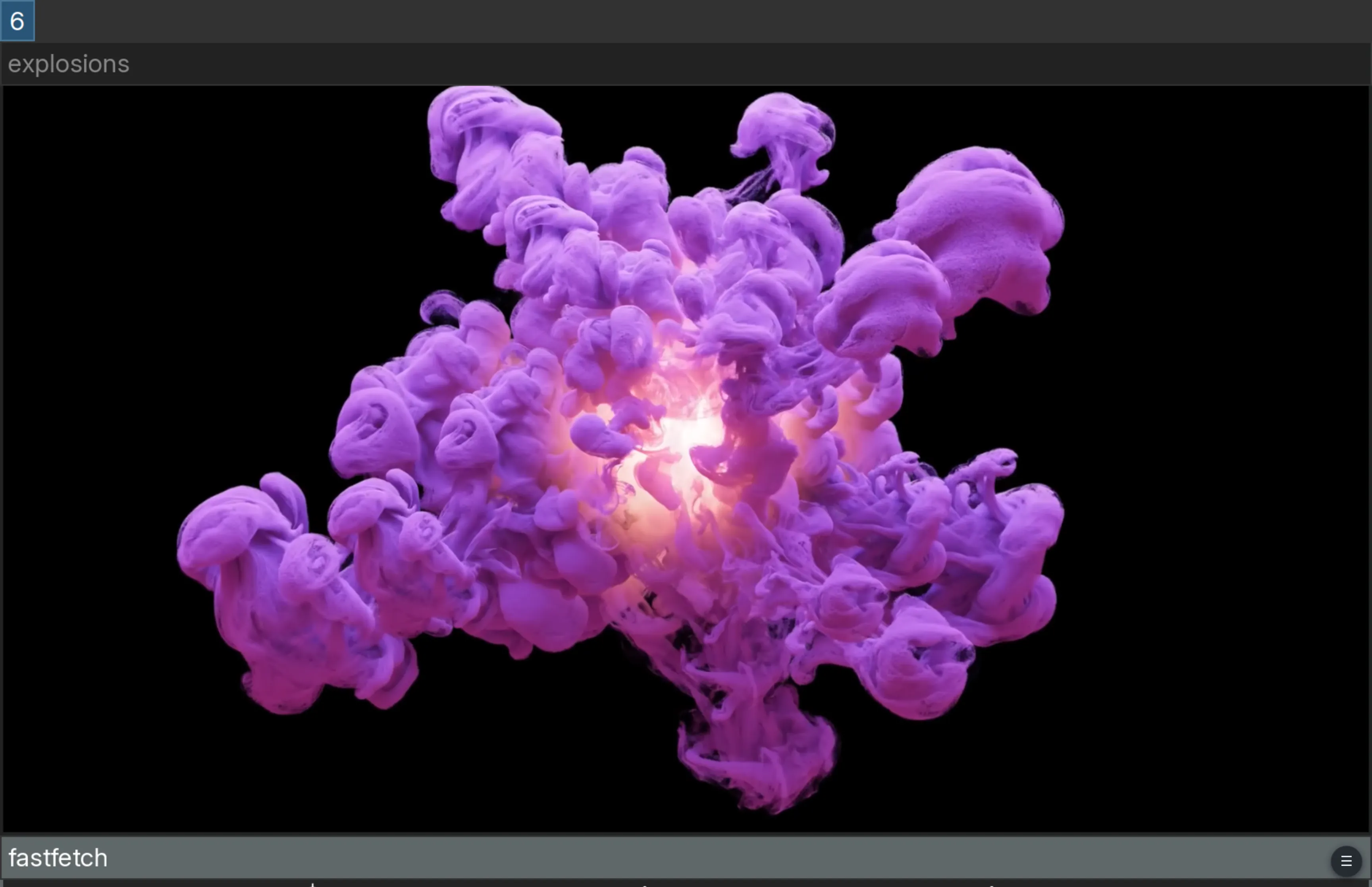
subtype = "wlshare": its pixels at 1x, twice the size, a quarter of it in the window.Beside the standard Raw and ZRLE, a client that asks is sent one of wlshare's own pictures, which zDesk offers as its picker's Picture group (see wlshare in the zDesk guide): its H.264 of the whole desktop, fitted to the link; RemoteFX Progressive tiles; lossless PNG tiles with a video stream for each region that moves; or lossless planar tiles, still or moving.
The H.264, of the whole desktop or of a moving region, is the host's hardware encoder where VA-API finds one, and libx264 at its fastest preset otherwise; hardware_h264 = false skips the hardware. The startup probe tries Intel's low-power encoder first, which leaves the GPU's execution units to the desktop, and logs what it found:
journalctl --user -b -u wlshare | grep h264
# hardware H.264: /dev/dri/renderD128 through VA-API, its low-power encoder
A VM without a video encoder, such as one on VirGL, codes every frame in software: the larger the output, the more of the host's processor that takes. max_fps, 30 by default, caps the frames captured; the zDesk page draws at most 30.
Clients
zDesk reaches wlshare as a vnc target with subtype = "wlshare", which makes the gateway ask for wlshare's density, outputs, pictures, sound, camera and microphone:
[[targets]]
name = "wayland"
protocol = "vnc"
subtype = "wlshare"
host = "192.0.2.12"
username = "me"          # leave out under [password]
password_ref = "wayland"
# virtual_displays = 2   # on sway, a second headless output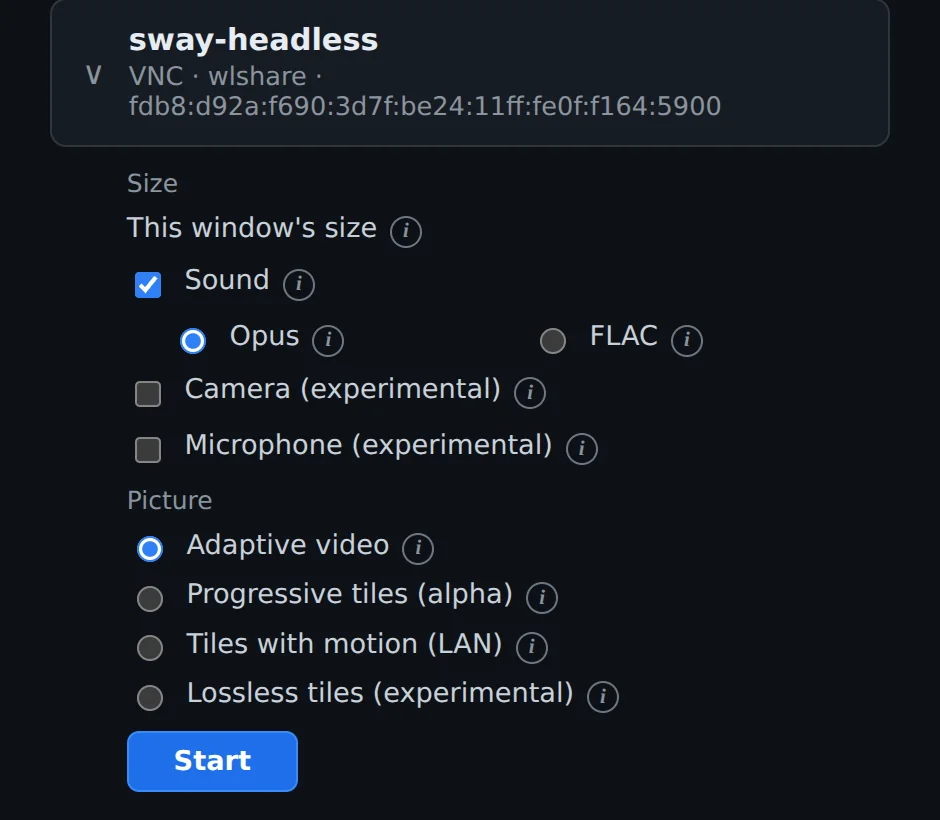
wlshare target: the size following the window, sound as Opus or FLAC, the camera and microphone, and wlshare's four pictures.Any other RFB 3.8 client that lists the Cursor pseudo-encoding and draws Raw rectangles can connect, at the output's own pixels and without sound: TigerVNC, for one, which speaks RSA-AES. Cursor is required because the pointer is never in the framebuffer. A client that does not list wlshare's extensions is not sent them. See wlshare in the zDesk guide for what a session is started with.